Learnwick: the LMS for small business
LMS for small business
Light up your learning without burning your budget.
Learnwick is a learning management system built for teams of 5 to 1,000. Upload your courses, assign training, issue certificates and track progress in one simple place — for a published price that starts at free.
Free for up to 30 learners · No credit card · Book a demo
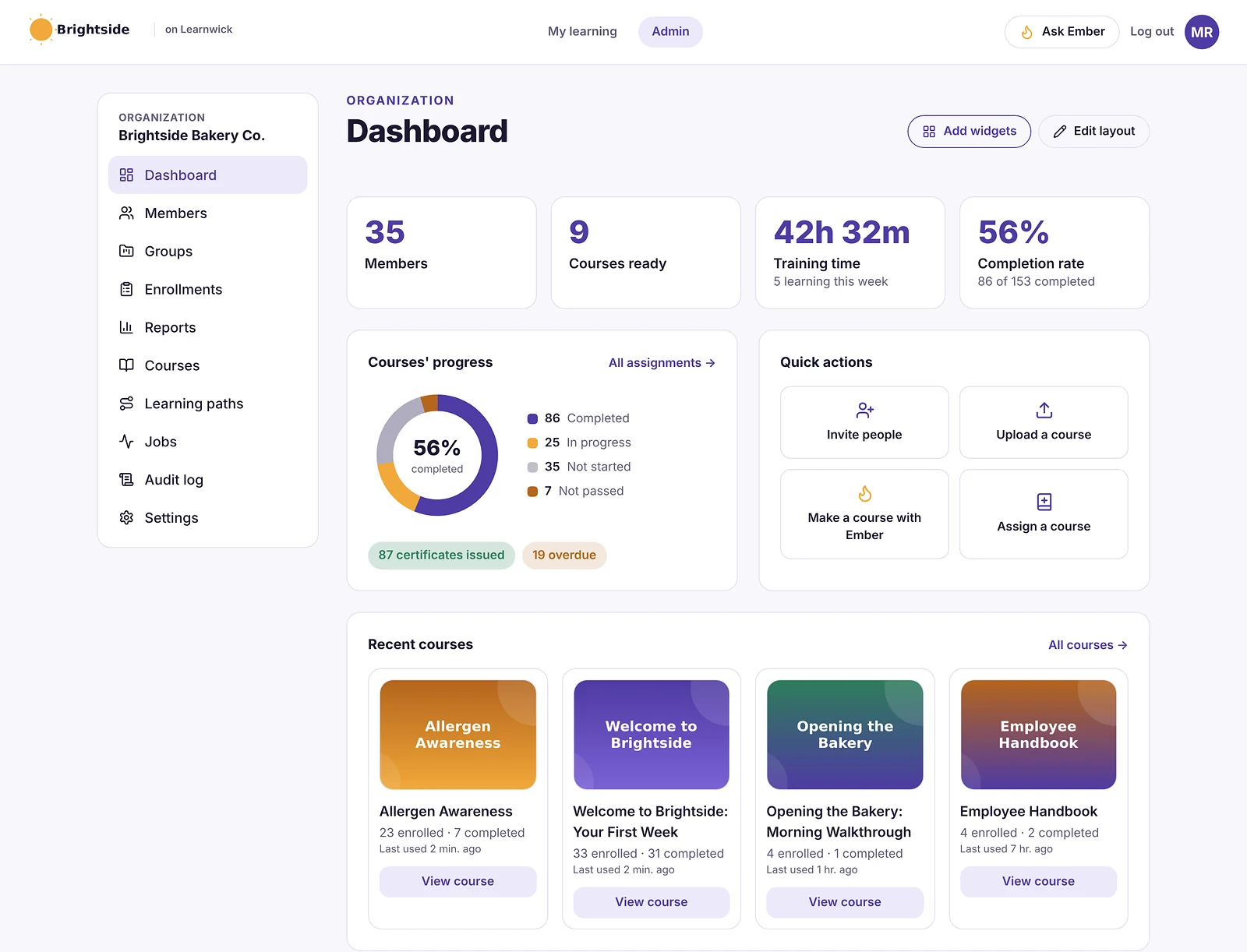
Live activity
9 people learning now
4 courses finished today
Ask Ember
Who in Sales is overdue?
3 people: Ana, Ben and Jo. All for Food Safety Basics. See them →
Certificate verified
Maria Santos · Food Safety Basics
LW-7KQ2-9XHM-4PRT
Completion rate
56% ▲ 6 pts
Last 7 weeks
- Prices you can seeEvery plan is listed below. No “contact us”.
- Free for 30 learnersNo card and no time limit.
- Every feature, every planPlans differ only in learner count.
- Built for 600+ at onceLoad test to 750 learners explained below.
Best features
What makes Learnwick the easy choice
Every feature below is on every plan — including the free one.
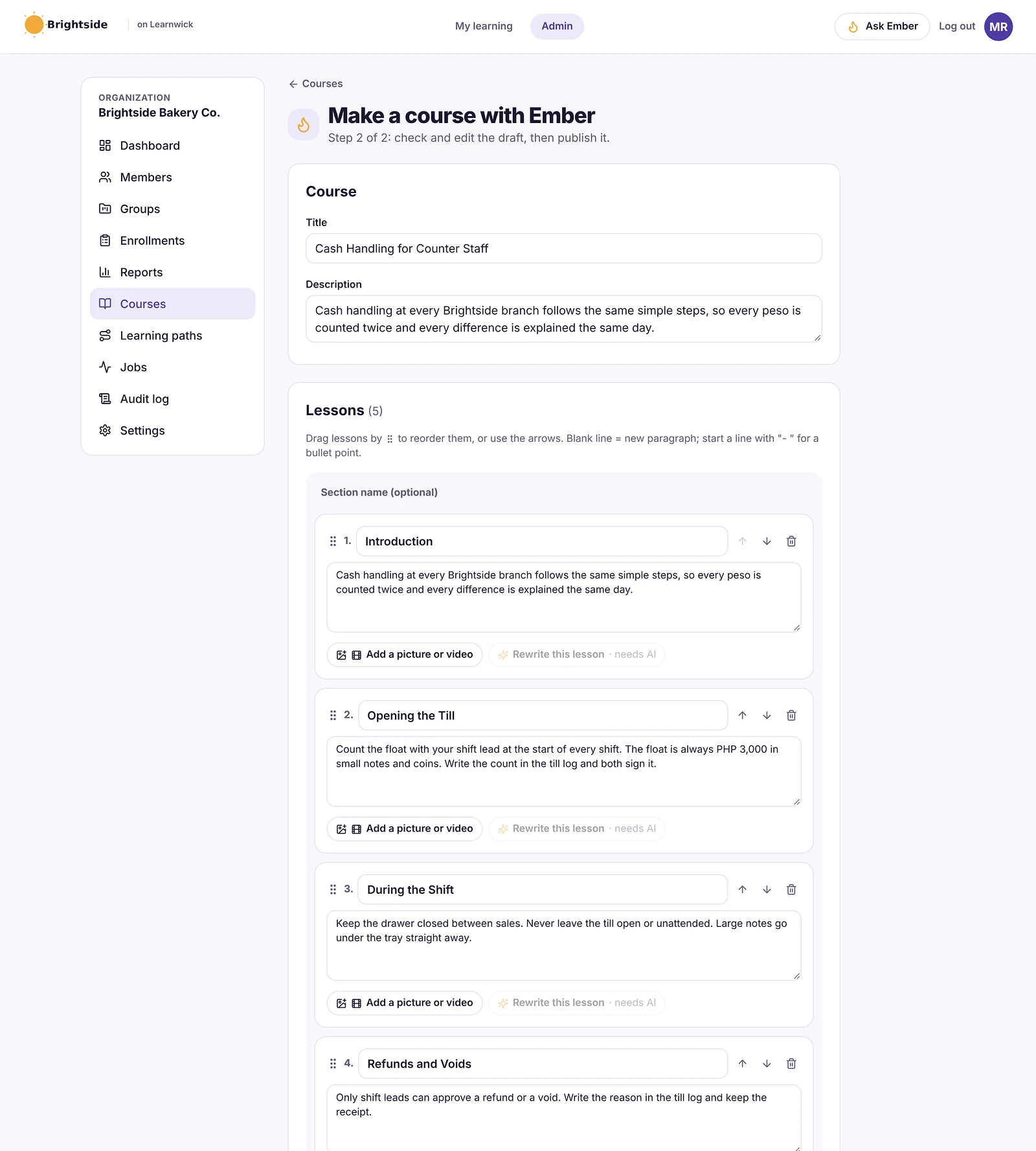
Ember AI course builder
Turn a policy into a course in minutes
Upload a PDF, Word file or meeting recording. Ember drafts the lessons and a quiz; you check, edit and publish.
- Lessons and quiz questions drafted for you
- Add pictures and videos, reorder lessons
- Translate a course into another language
Due dates and reminders
Learnwick does the chasing for you
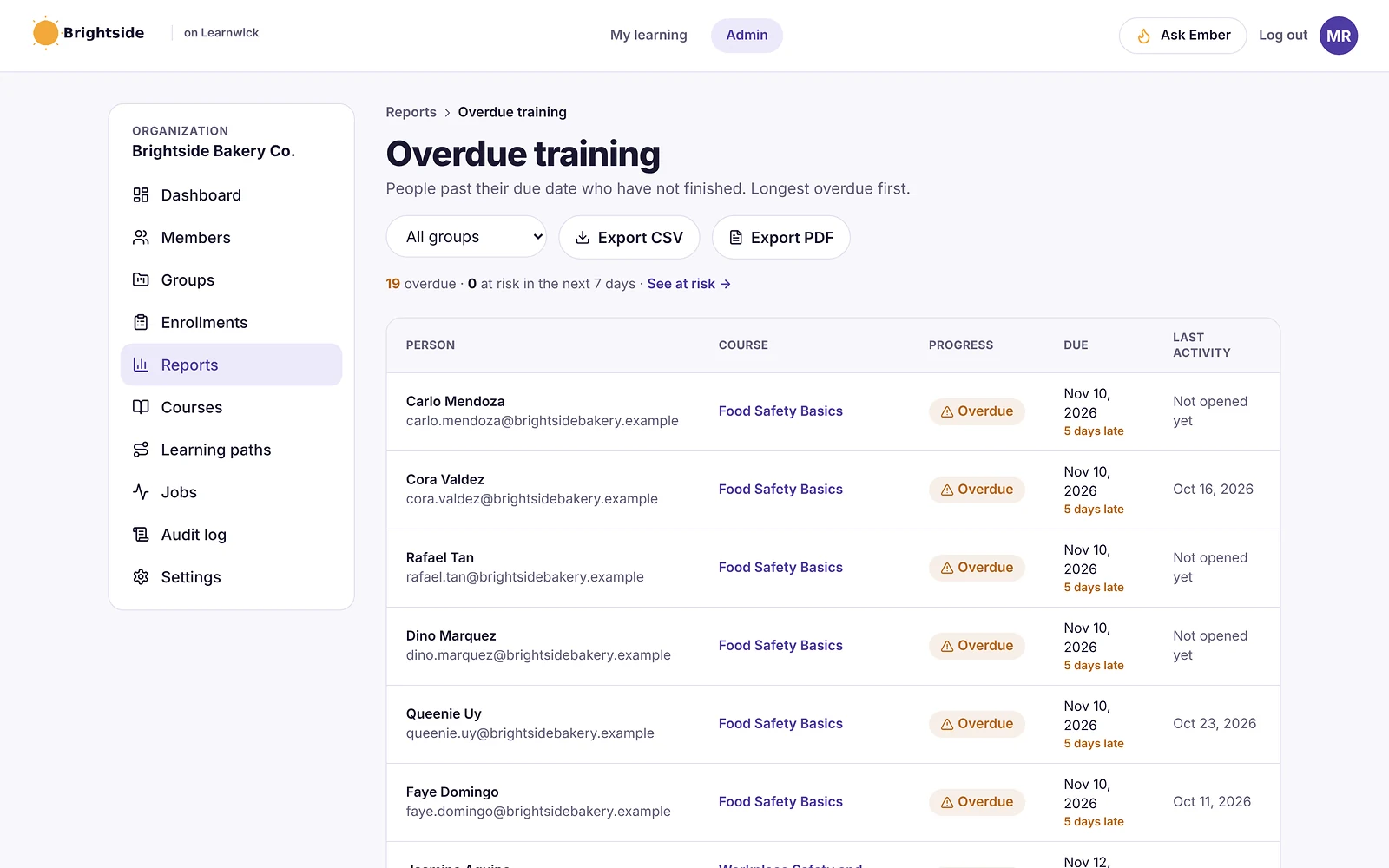
Give every course a due date. Learners get emails when it’s new, due soon and overdue — and managers hear about late training too.
- Automatic due dates per course
- Reminder emails in each learner’s language
- Overdue report, most overdue first
Certificates
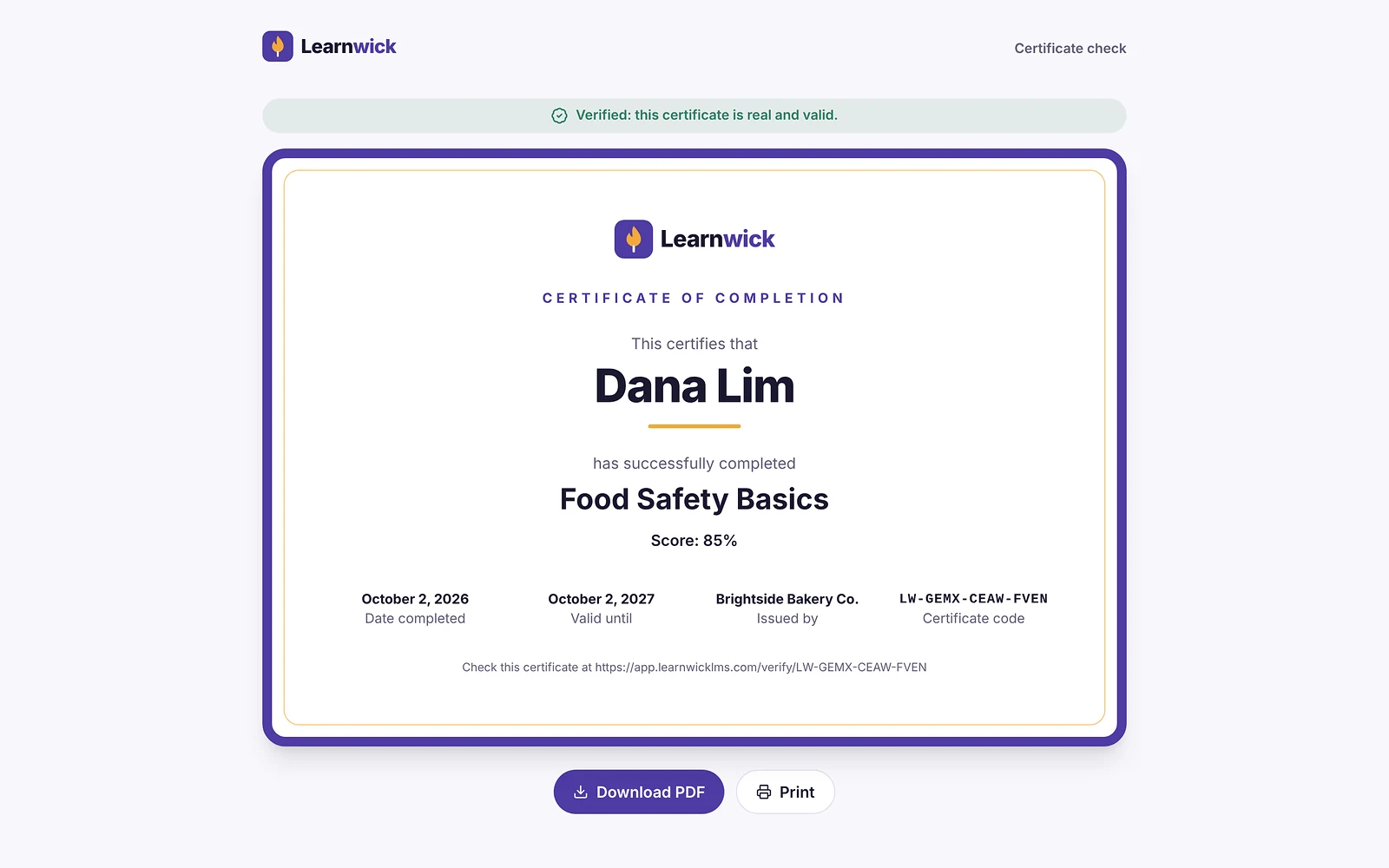
Certificates anyone can check
Branded PDF certificates are issued the moment someone passes. Each has a code that a client or auditor can verify online.
- Your logo and colour on every certificate
- Expiry and yearly renewal reminders
- Public check page — no login needed
Reports and analytics
Know who’s done, who’s late and who’s struggling
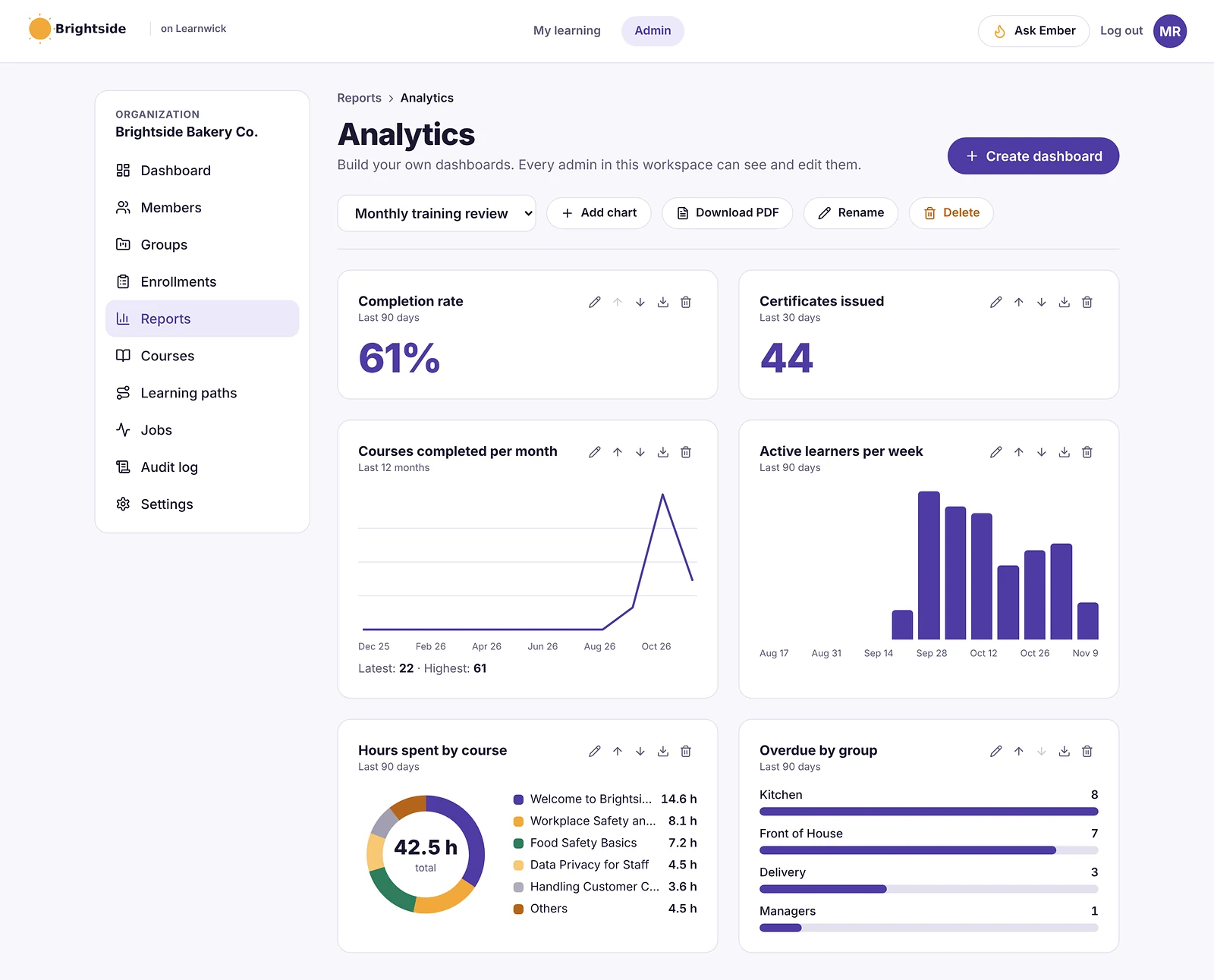
Completion rates, overdue and at-risk learners, a training matrix of everyone against every course, and dashboards you build yourself.
- Training matrix and training gaps by role
- Export any report to CSV
- Ask Ember: “Who in Sales is overdue?”
Quizzes
Quizzes with pass marks and tries
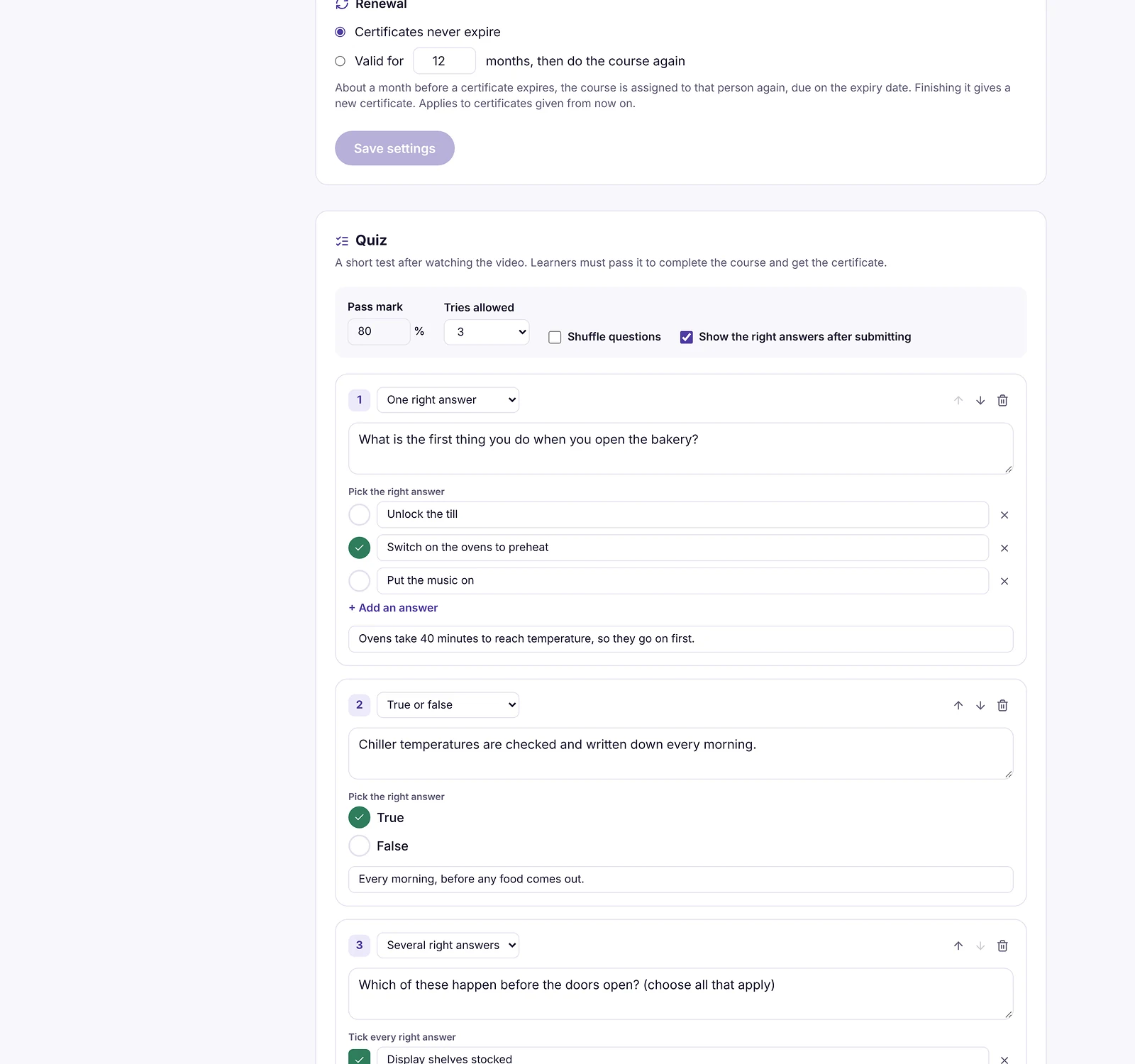
Add a quiz to any video, PDF or Ember course. Answers are marked on the server, and the results show which questions trip people up.
- Single answer, true/false and multiple answer
- Pass mark and number of tries
- Give someone one more try in a click
Works on phones
Training that fits in a shift
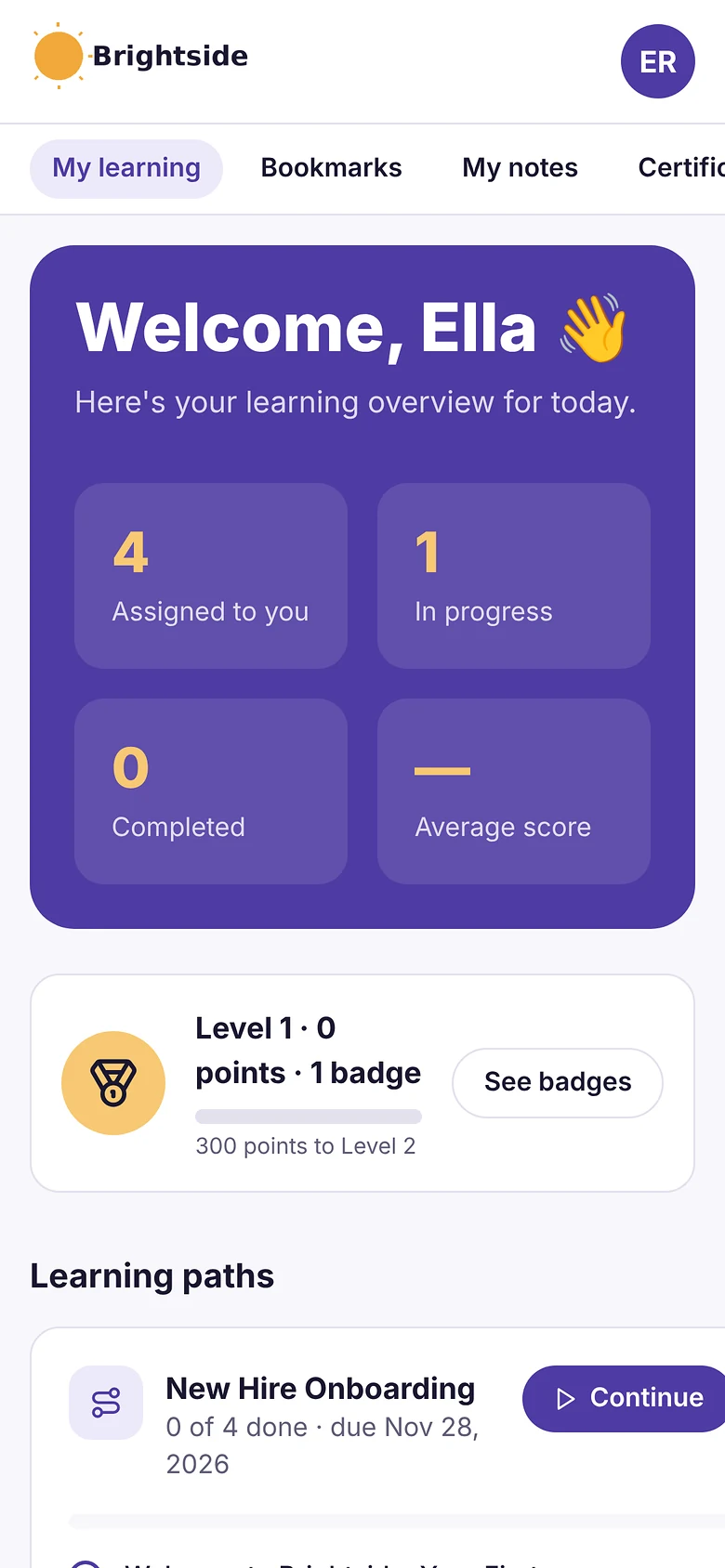
Learners open their courses on any phone — on the shop floor, in the van or at home. No app to install, and progress is saved as they go.
- Learning paths for new hires
- Optional points, badges and leaderboard
- Your brand, not ours
Everything a small business LMS needs — nothing it doesn't
SCORM 1.2 and 2004
Upload the zip from your authoring tool. Scores, progress and completion are tracked.
Video and PDF courses
MP4, WebM and PDF become courses too — no authoring tool needed.
Ember course builder
Give Ember a document and get a draft course with lessons and a quiz to review.
Learning paths
Ordered sets of courses, assigned together, taken in order.
Certificates anyone can check
PDF certificates with a code your learners can prove at app.learnwicklms.com/verify.
Reports and dashboards
Completion, time spent, quiz scores, overdue and at-risk learners. CSV and PDF exports.
Your logo and color
Learners see your brand, not ours.
Works on phones
Learners can take courses on the shop floor, in the van or at home.
Ask Ember
Ask “who is overdue in Sales?” or “assign Food safety to Branch 2” — Ember prepares it, you confirm.
Courses and emails in their language
Translate a course with Ember and send reminders in English, Filipino, Cebuano, Spanish or Bahasa.
Join link
Share one link and new staff add themselves — straight into the right group and courses.
Points, badges and leaderboard
Optional game-style rewards that make finishing training a little more fun.
Simple pricing. Seriously affordable.
Plans differ only in how many learners they allow. Every feature is on every plan.
Starter
Up to 100 learners
$79/month
$99/month
No credit card needed.
Most popular
Growth
Up to 500 learners
$239/month
$299/month
No credit card needed.
Business
Up to 1,000 learners
$399/month
$499/month
No credit card needed.
Enterprise
Starts at 1,000 learners
Need more?
Custom annual plan for large teams.
Tailored to your team.
- AI course builder on every plan
- Certificates on every plan
- Reports and audit pack on every plan
- Branding on every plan
- Integrations on every plan
- Ember assistant on every plan
- No setup fee
What an LMS for small business really costs
The full yearly price for your team size, worked out for you. No per-feature add-ons, no setup fee.
| Learners | Plan | Per year | Per learner, per month |
|---|---|---|---|
| 10 | Free | Free | $0 |
| 25 | Free | Free | $0 |
| 50 | Starter | $948 | $1.58 |
| 100 | Starter | $948 | $0.79 |
| 250 | Growth | $2,868 | $0.96 |
| 500 | Growth | $2,868 | $0.48 |
| 1,000 | Business | $4,788 | $0.40 |
Prices in USD, billed yearly. Paying monthly costs 25% more. Over 1,000 learners? Ask us for an Enterprise plan.
Total cost of ownership
Learnwick vs other small business LMSs: the yearly bill
What a year costs for 30 and 100 learners, from each vendor's public prices. Most LMSs charge per registered user, add setup fees or keep features for bigger plans, so the sticker price is rarely the whole bill.
| LMS | Free plan | 30 learners / year | 100 learners / year | How it's priced |
|---|---|---|---|---|
| Learnwick LMS | 30 learners, no time limit | Free | $948 | Published plans; every feature on every plan |
| TalentLMS | 5 users, 10 courses | $1,428 | $5,388 | User brackets; features differ by plan |
| iSpring Learn | No (30-day trial) | $8,286 (sold from 100 users) | $8,286 | User bands; authoring tool extra |
| 360Learning | No (30-day trial) | $2,880 | $9,600 | $8 per user per month |
| Zoho Learn | 5 users | ≈$360–$1,080 | ≈$1,200–$3,600 | Per user per month |
| Easy LMS | No | ≈$2,300 (Advanced, for SCORM) | ≈$2,300 | Flat fee, capped monthly starts |
| Moodle | Open source | Hosting + admin time, or MoodleCloud from ≈$160 | Hosting + admin time, or a MoodleCloud plan | You host it, or MoodleCloud |
| Trainual | No | ≈$3,700 + ≈$1,000 setup | ≈$6,200 + ≈$1,000 setup | Quote only since 2026 |
| Absorb LMS | No | Not sold under 100 | Quote (median ≈$20,000) | Quote, annual contract |
USD, billed yearly, checked November 2026 from public pricing pages and price trackers. ≈ = estimate. Click a name for the full, honest comparison (including where the other LMS wins). Learnwick counts every person in your workspace, invited or active, as a seat; switching someone off frees their seat.
The basics
What is an LMS for small business?
A learning management system (LMS) is software that stores your training, assigns it to people, tracks who finished and keeps the records. A small business LMS, sometimes called small business training software or an SMB LMS, does that without needing a training department to run it.
| Area | Small business LMS | Enterprise LMS |
|---|---|---|
| Who runs it | One busy person, part-time | An L&D or HR systems team |
| Setup | An afternoon, on your own | An implementation project, often 2–6 months |
| Price | Published, from free | Quote and annual contract |
| Features | The essentials, all included | Large catalogue, many add-ons |
| Integrations | A few that matter (HR system, forms, CSV) | Many, plus custom API work |
| Learners | Roughly 5 to 1,000 | Thousands to hundreds of thousands |
LMS or online course platform?
Course platforms such as Teachable or Kajabi are built to sell courses to the public. An LMS like Learnwick is built to train your own staff, customers and partners: due dates, reminders, reports and certificates. Learnwick doesn't take payments for courses.
What counts as a small business?
It depends on the country and industry. The US Small Business Administration's size standards often draw the line at 500 employees, and the Philippines counts firms with up to 199 staff as micro, small and medium enterprises. Learnwick's published plans cover teams of up to 1,000 learners.
Why bother
Benefits of an LMS for a small business
64% of small businesses already use an LMS, yet training and upskilling is a top HR challenge for 46% of them.
Source: Capterra, Best LMS for Small Business in 2026 (July 2026).
Less chasing
Due dates and reminder emails do the follow-up that usually lives in a spreadsheet and your inbox.
Proof when someone asks
Who did what, when, with which score and certificate: ready for an auditor, client or insurer.
Faster onboarding
New hires get the same courses in the same order on day one, wherever they work.
Knowledge that stays
Your procedures become courses, so they don’t walk out the door with the person who knew them.
A quick way to check the return on investment
Add up the hours you spend each month chasing people, building spreadsheets and finding certificates, and multiply by what an hour costs you. If that's more than the plan price, the LMS pays for itself before you count fewer mistakes, faster onboarding or a smoother audit. On Learnwick's Starter plan, 100 learners cost $79 a month, about $0.79 per learner.
Who it's for
One employee training platform for every kind of training
Most small businesses start with one job, onboarding or compliance, and grow from there. Learnwick covers all of them in one workspace.
Employee onboarding
Put onboarding courses in a learning path so every new hire takes them in order. Day 3 and day 7 check-ins tell managers who is behind.
Compliance training
Workplace safety (OSHA), food safety, HIPAA privacy, data privacy and anti-harassment training: set due dates, renew certificates every year and build an audit pack in one click. Learnwick tracks and proves the training; the course content for your rules comes from you, a ready-made course or Ember.
Customer and partner training
Give each customer, reseller or franchisee their own group with its own manager and join link, so they only see their courses. Certificates carry your logo and color.
Frontline and deskless staff
Shop-floor, kitchen, warehouse and field staff learn on their own phone in the browser, with no app to install. It needs a connection; progress is saved as they go.
Popular with these industries
Course content
Three ways to fill your LMS with courses
You don't need an authoring tool or an instructional designer. Mix and match: most teams start with the documents they already have.
Bring your own
Upload SCORM 1.2 or single-SCO SCORM 2004 zips from Storyline, Rise, iSpring or Captivate, or MP4/WebM videos and PDFs. Add a quiz to any video or PDF.
Learn more →Start from a ready-made course
A small starter set of ready-made courses, such as Workplace Safety Basics and Data Privacy Essentials, that you can edit before you assign them. It isn’t a library of thousands of courses.
Build with Ember
Give Ember a PDF, Word file or meeting recording and it drafts short lessons and quiz questions. You review and edit every lesson, then publish.
Learn more →How Ember handles your documents
- Ember runs on Amazon Bedrock. Your content is not used to train AI models.
- Drafts are never published by themselves: you check and edit every lesson and question first.
- Ember never changes your workspace on its own. Assigning, inviting or reminding needs your “Yes, do it”.
- Meeting recordings are deleted once their text has been read. Translations and policy updates also come back as drafts to review.
You can also ask Ember in plain language to do admin jobs, like “assign Food Safety to Branch 2” or “who in Sales is overdue?”. It prepares the change and waits for you.
Integrations
Connects to the tools you already use
Learnwick keeps its integrations few and useful: getting the right people in, with the right courses, without retyping names.
Not connected (yet)
Learnwick doesn't connect to Salesforce, Slack, Microsoft Teams, Zoom or Zapier, and has no public API or webhooks out yet. It plays SCORM 1.2 and 2004, but not xAPI, cmi5 or AICC. “Continue with Google” and “Continue with Microsoft” sign-in are built but not switched on; SAML single sign-on isn't supported. If one of these is a must for you, tell us: it decides what we build next.
Security, privacy and accessibility
How Learnwick protects your training records
Training records hold names, emails, scores and certificates. Here is what is in place today, and what isn't yet.
Where your data lives
- Amazon Web Services in Sydney, Australia
- HTTPS on every connection
- Card payments handled by Paddle; we never see card numbers
Sign-in protection
- Passwords stored as bcrypt hashes
- Account paused after 10 wrong passwords in 15 minutes
- Log out, password reset or switch-off signs people out on every device
Admin roles
- Owner, Admin, Manager and Learner roles
- Managers see their own groups, read-only
- Only the Owner can make or change Admins
Audit log
- Who changed what, and when, including Ember actions
- Keep it 1–7 years, or forever
- Quiz answers marked on the server, never in the browser
Privacy and compliance
Learnwick is run by Rainmakers Training Services in the Philippines under the Data Privacy Act of 2012. Closed workspaces are deleted within 30 days of a request. Not yet: SOC 2 report, ISO 27001 certificate or a GDPR assessment. If you train people in the EU or UK, email us first. Those certifications are on our list as the customer base grows.
Accessibility
Built to WCAG 2.1 AA practices: keyboard-friendly dialogs, checked color contrast, page landmarks and 44-pixel tap targets. Not yet: a formal WCAG or Section 508 audit. Accessibility inside SCORM courses depends on the tool that made them.
Rollout plan
From sign-up to a trained team in about a month
No IT team and no implementation project. Most small teams follow these four steps; the first one takes an afternoon.
- 1
Day 1
Set up
Create your workspace, add your logo and color, upload or build your first course.
- 2
Week 1
Pilot
Invite 5–20 people from one team. Check the course works on their phones and the reports answer your questions.
- 3
Weeks 2–3
Roll out
Import everyone by CSV, BambooHR or a join link. Make groups per team or branch, assign courses with due dates.
- 4
Week 4 on
Let it run
Reminders, renewals and manager emails go out by themselves. Pull an audit pack whenever you need one.
Proof and support
New, small and honest about it
Learnwick launched in 2026, so it doesn't have hundreds of reviews yet. Here is what you can check for yourself today, and how to reach us.
Certificates anyone can check
Every certificate has a code. Your auditor or client checks it on a public page, no login.
Try the check page →Built for 600+ learners at once
A load test copies real learners: 600 taking courses for 10 minutes, then a rush to 750, with no progress saves lost. We’ll publish the results from our production servers here.
Made in the Philippines
Reminder emails in English, Filipino, Cebuano, Spanish and Bahasa Indonesia, and Ember translates courses, for teams across Southeast Asia.
See multilingual training →A small company you can reach
Learnwick is founder-led. You talk to the people who build it, and your feedback really changes what ships next.
Meet the founder →Customer support on every plan, including Free
Help chat in the app
Ask a question from any screen and get the right help guide.
Step-by-step guides for admins and learners.
hello@learnwicklms.com, answered by the team, on every plan.
30 minutes on Google Meet, with your own training in mind.
Using Learnwick already? A review on G2 or Capterra helps other small teams find us.
How to choose
How to choose an LMS for your small business: 8 questions to ask every vendor
Run a short pilot with 10 to 20 people before you commit, and ask each LMS these questions. We've put our own answers next to them.
| Ask the vendor | Why it matters | Learnwick's answer |
|---|---|---|
| What will I pay in year one for my team size, all in? | Setup fees, per-feature add-ons and user brackets hide the real cost. | Published plans, no setup fee, every feature included. |
| Do you charge per registered or per active user? | Per registered user, everyone you ever invite counts. | Everyone in the workspace is a seat; switching someone off frees it. |
| Can I try it with a real course and real people, free? | A demo shows the vendor’s data, not yours. | Free plan for 30 learners, no card, no time limit. |
| Will my existing courses work? | Ask which SCORM versions, xAPI and file types are supported. | SCORM 1.2 and 2004 (single-SCO), video and PDF. No xAPI yet. |
| How do people get in, and out? | Manual adding doesn’t last past 50 people. | CSV, join link, Typeform, BambooHR; leavers switched off with records kept. |
| What does your security look like, in writing? | Ask for certifications, data location and SSO. | AWS Sydney, hashed passwords, audit log. No SOC 2 or SAML yet. |
| Will my auditor accept the reports? | You need dates, scores, versions and certificates. | Audit pack PDF/CSV and certificates anyone can verify. |
| Can learners use it on a phone? | Frontline staff rarely sit at a desk. | Yes, in the browser. No native app or offline mode. |
LMS for small business: common questions
What is the cheapest LMS for a small business?
Free open-source systems such as Moodle cost nothing to download, but you pay for hosting, updates and someone's time to run them. Learnwick is free for up to 30 learners with no time limit, and $79 a month (billed yearly) for up to 100 learners — every feature included, prices published, no sales call.
What is the easiest LMS for a small business to set up?
Look for one you can try on your own in an afternoon: sign up, upload a course, invite a few people. With Learnwick you create a workspace in about a minute, upload a SCORM, video or PDF course (or let Ember build one from a document), and invite your team by email or CSV.
Does Microsoft 365 (Office 365) have an LMS?
Not a full one. Microsoft Viva Learning is a paid add-on that gathers learning content inside Teams and connects to an LMS, and SharePoint can store training files, but neither tracks SCORM course progress on its own. Many small businesses keep Microsoft 365 for everyday work and use a separate LMS for assigning training, tracking completion and issuing certificates.
Can I build my own LMS?
You can, with WordPress plugins or open-source software, and it can make sense if you have a developer to spare. You also take on hosting, security updates, SCORM tracking, certificates and reports. A ready-made LMS for small business usually costs less than the hours a home-made one needs.
Can I use the courses I already have?
Yes. Learnwick plays SCORM 1.2 and SCORM 2004 courses from Articulate Storyline, Rise, iSpring, Captivate and other authoring tools, plus MP4 and WebM videos and PDFs. Progress, scores and completions are tracked for all of them.
Do I need a credit card to start?
No. The Free plan covers up to 30 learners and never asks for a card. Paid plans differ only in how many learners they allow — no feature is locked to a bigger plan.
What is the difference between a free plan and a free trial?
A free trial ends, usually after 14 or 30 days, and then you pay or lose access. A free plan keeps working. Learnwick's Free plan has no time limit for up to 30 learners with every feature, and you only move to a paid plan when your team grows past that.
Does a small business really need an LMS?
Under about 10 people, shared folders and a checklist can be enough. Once you have training with due dates, renewals or an auditor to answer to, or new hires starting every month, an LMS saves the chasing and gives you records you can show. A free plan lets you find out without spending anything.
Does Learnwick support xAPI, cmi5 or AICC?
Not yet. Learnwick plays SCORM 1.2 and single-SCO SCORM 2004, plus MP4/WebM video and PDF. Most authoring tools (Storyline, Rise, iSpring, Captivate) can export SCORM, so this covers most small-business courses.
Can learners use Learnwick offline or in a mobile app?
No. Learners use Learnwick in the browser on any phone, tablet or computer, with nothing to install, and progress is saved as they go. It needs an internet connection; there is no native app or offline mode yet.
Is my training data secure?
Learnwick runs on AWS in Sydney over HTTPS, stores passwords as bcrypt hashes, pauses an account after 10 wrong passwords in 15 minutes, keeps an audit log of every change and separates admin, manager and learner access. It does not have a SOC 2 report or ISO 27001 certificate yet.
How do I get staff to actually finish their training?
Keep courses short, give each one a due date and let reminders do the chasing: Learnwick emails learners when training is new, due soon and overdue, and tells managers who is late. Optional points, badges and a leaderboard help too, and Ember can turn long documents into short lessons with a quiz.
Do you charge per active user or per registered user?
Per person in your workspace. Everyone you invite, including pending invites, uses a seat, so there are no surprise bills for busy months. When someone leaves, switch them off: their seat is freed and their records stay in your reports.
Give your team training they'll actually finish
Start free with up to 30 learners. Upgrade only when your team grows.
- No credit card
- Every feature included
- Set up in an afternoon
Rather see it first? Book a demo