10 Best KnowBe4 Alternatives in 2026 (With LMS Integration)
For security awareness and phishing simulation, Hoxhunt, Proofpoint ZenGuide, Mimecast Engage, SoSafe and Huntress Managed SAT are the main KnowBe4 alternatives in 2026; Microsoft Attack Simulation Training is included with Microsoft 365 E5. If you want security courses to sit alongside the rest of your compliance training, with one record and certificates that renew, Learnwick LMS is free for up to 30 learners and runs SCORM courses from security training vendors.
Key takeaways
- KnowBe4 lists security awareness training at about $1.63 to $3.75 per seat per month on a three-year term, depending on seats and content level.
- It offers lightweight SCORM downloads that stream its content into a third-party LMS, if SCORM downloads are enabled on your plan.
- Main alternatives: Hoxhunt, Proofpoint ZenGuide, Mimecast Engage, SoSafe, Huntress Managed SAT, Adaptive Security and Usecure; Microsoft Attack Simulation Training comes with Microsoft 365 E5.
- To keep security training with your other compliance training in one record, Learnwick LMS is free for up to 30 learners.
In this guide
- In summary
- KnowBe4 in 2026: what it does and what it costs
- How we compared these KnowBe4 alternatives
- 1. Learnwick LMS
- 2. Hoxhunt
- 3. Proofpoint ZenGuide
- 4. Mimecast Engage
- 5. SoSafe
- 6. Huntress Managed SAT
- 7. Adaptive Security
- 8. Usecure
- 9. Microsoft Attack Simulation Training
- 10. NINJIO
- Security awareness platform vs LMS: which does what
- How “LMS integration” works for security training
- What to look for in a KnowBe4 alternative
- What a KnowBe4 alternative really costs
- Security training topics beyond phishing
- Making security training stick
- Building a yearly security awareness program
- Compliance frameworks that expect security training
- Questions to ask in a security awareness demo
- Small business? A practical setup
- How to switch from KnowBe4
- Choose by what you need
- Frequently asked questions
In summary
Security awareness platforms and learning management systems do different jobs, so here’s the short version for each:
If you need phishing simulation and security awareness training:
- Best for engagement and behavior change: Hoxhunt.
- Best if you use Proofpoint email security: Proofpoint ZenGuide.
- Best for EU and GDPR-first organizations: SoSafe.
- Best for MSPs and small businesses: Huntress Managed SAT or Usecure.
- Best if you already pay for Microsoft 365 E5: Microsoft Attack Simulation Training.
If you need one LMS for security and all other compliance training:
- Best overall: Learnwick LMS — free for up to 30 learners, then $79/month billed yearly ($99 monthly) for up to 100 learners. Upload security SCORM courses next to your policies, with due dates, reminders and yearly certificates.
Disclosure: Learnwick LMS publishes this guide. Learnwick is a learning management system, not a phishing-simulation platform, so it complements the tools below rather than replacing KnowBe4’s simulations. We list it first because “KnowBe4 alternatives with LMS integration” is a common search, and we’re clear about what it doesn’t do.
KnowBe4 in 2026: what it does and what it costs
KnowBe4 was founded in 2010 in Clearwater, Florida, by Stu Sjouwerman. Private-equity firm Vista Equity Partners took it private in 2023. It’s the largest security awareness training vendor, with about 4.8 out of 5 from thousands of G2 reviews.
What KnowBe4 does well
- Phishing simulation with a huge template library and unlimited tests.
- Training library in many languages, with automated campaigns.
- AI agents (AIDA) and real-time coaching that nudges users after risky actions.
- PhishER for triaging reported emails.
- Learner app for mobile training.
- SCORM downloads: a single lightweight SCORM file that streams current content and languages from KnowBe4 into your own LMS.
How it’s priced (May 2026 list)
| Seats | SAT Foundation | SAT Advanced |
|---|---|---|
| 25–50 | $2.40 per seat per month | $3.75 per seat per month |
| Larger tiers (up to 1,000) | Falls to about $1.63 | Lower per seat |
Prices are list, on a three-year term; one-year terms cost more, and discounts are common. Older plan names (Silver, Gold, Platinum, Diamond) still appear in many contracts.
Why people look for alternatives
- Engagement: some teams find phishing tests become a checkbox and want more adaptive, behavior-based programs.
- Price at renewal: multi-year terms and price rises at renewal.
- Ecosystem fit: Proofpoint, Mimecast or Microsoft customers can bundle security awareness.
- One training record: many companies want security training tracked in the same LMS as harassment, safety and policy training.
How we compared these KnowBe4 alternatives
For security awareness platforms we looked at:
- Phishing simulation: templates, AI-generated attacks, reporting buttons.
- Training content: quality, languages and length.
- Behavior change: adaptive difficulty, coaching and risk scores.
- LMS integration: SCORM exports, LMS connectors or APIs, so completions show in your LMS.
- Price and fit: per seat, minimums and bundles.
For the LMS side we looked at what compliance teams need: all mandatory training in one place, due dates, reminders, renewals and exportable records. Details were checked in November 2026 on vendor pages and independent comparisons.
1. Learnwick LMS
Best for: companies that want security awareness courses tracked in the same LMS as all their other compliance training, with one record per person and certificates that renew each year. Not a phishing-simulation tool.
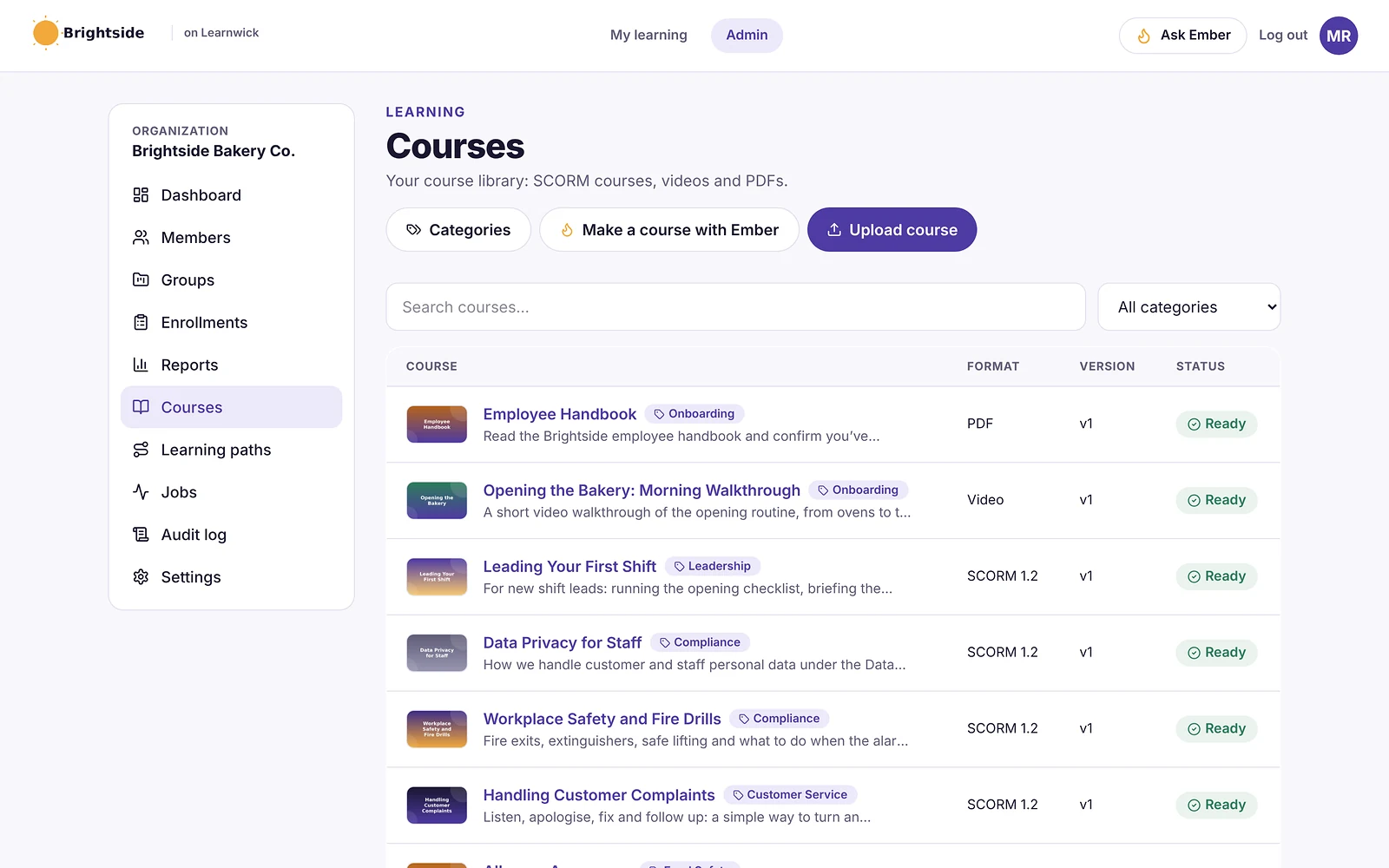
Learnwick LMS is a cloud LMS for teams without a training department. In practice, one person can set it up in an afternoon: create a workspace, add your logo, upload a SCORM course or let the AI assistant build one from a document, invite people and assign training with a due date. Learners open it on any phone or computer without installing an app.
Why Learnwick is a strong security training alternative
One record for all mandatory training. Upload security awareness SCORM courses (from KnowBe4’s SCORM downloads, another vendor, or your own) next to harassment, safety and policy courses. Every person has one training history.
Due dates, reminders, renewals. Assign security training yearly with a due date; reminders chase late learners and managers get a weekly summary. Certificates renew automatically.
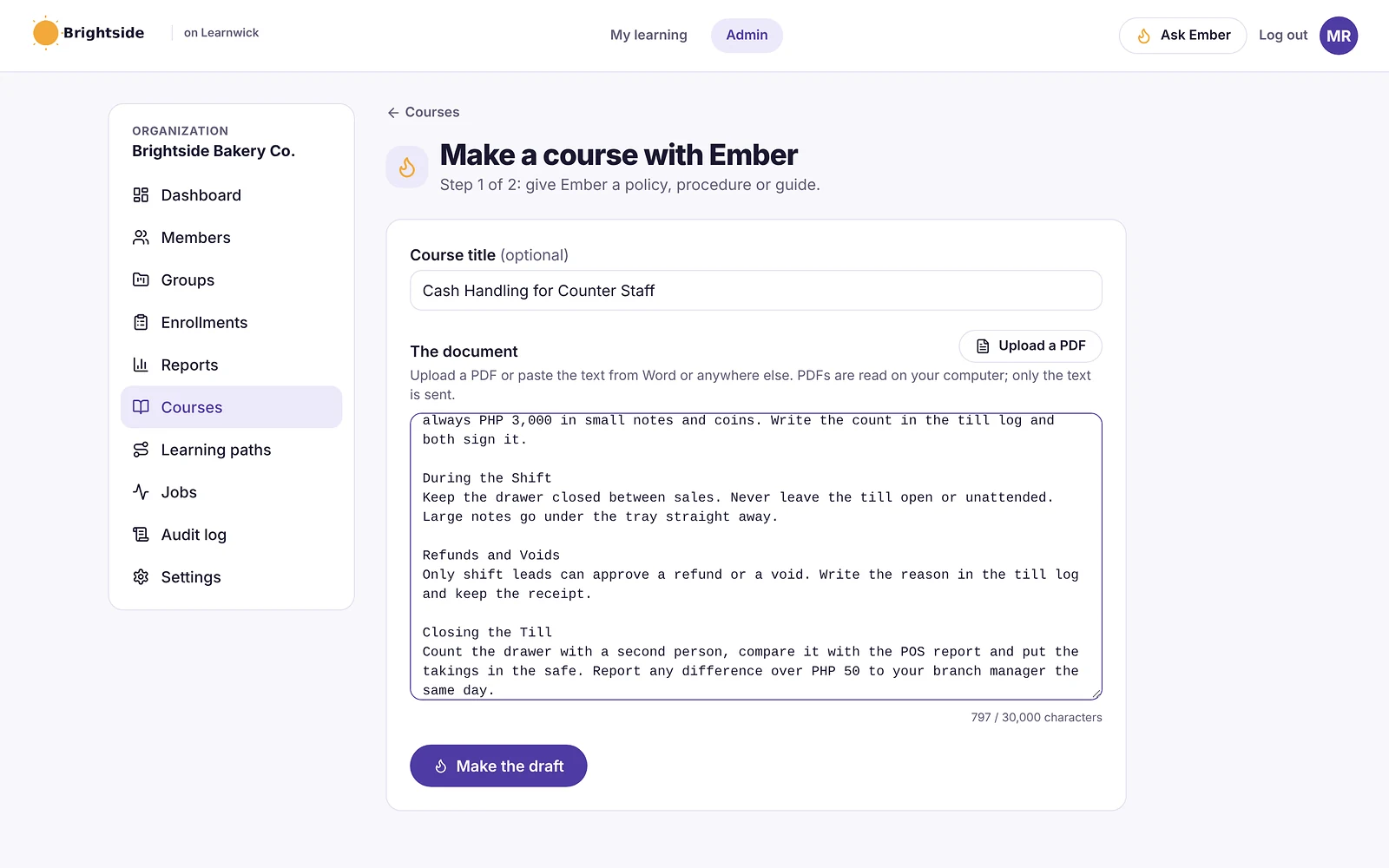
Your own security policies as courses. Ember turns your acceptable-use, password or data-handling policy into lessons and quiz questions you check.
Audit-ready. Export completions and quiz scores for ISO 27001, SOC 2 or cyber-insurance questionnaires.
Published prices. The Free plan covers 30 learners. 100 learners cost $948 a year.
The honest trade-off: no phishing simulation, risk scores or email reporting button. Keep a security awareness platform for those, and test a vendor’s SCORM package in Learnwick before rolling it out (Learnwick runs SCORM 1.2 and single-SCO SCORM 2004).
To give you a concrete example, at Learnwick, we don’t simply keep security training in its own silo. Security courses sit next to harassment, safety and policy training, so that each person has one training record. And that’s usually what an auditor or insurer actually asks for.
Key features
- Courses you already have: SCORM 1.2 and single-SCO SCORM 2004 packages from Storyline, Rise, Captivate or iSpring, plus videos and PDFs with optional quizzes.
- Ember, the AI course builder: paste a policy or upload a PDF or Word file and Ember drafts lessons and quiz questions you check before publishing. It can also translate a course.
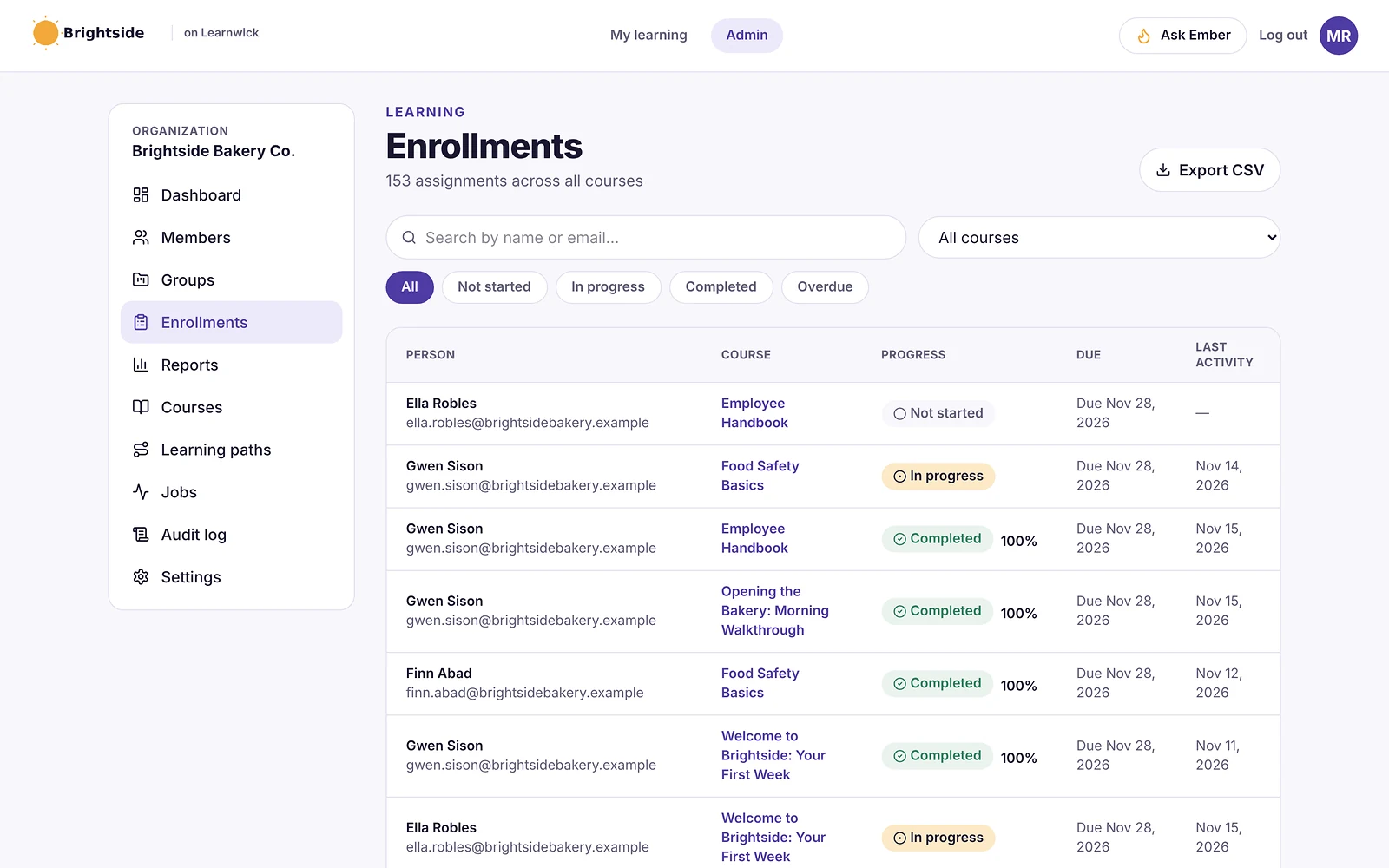
- Assignments with due dates: assign a course to a person or a whole group; new group members get the group’s courses automatically.
- Automatic reminders: late learners get reminders, managers get a weekly summary, and finishing one course can assign the next one.
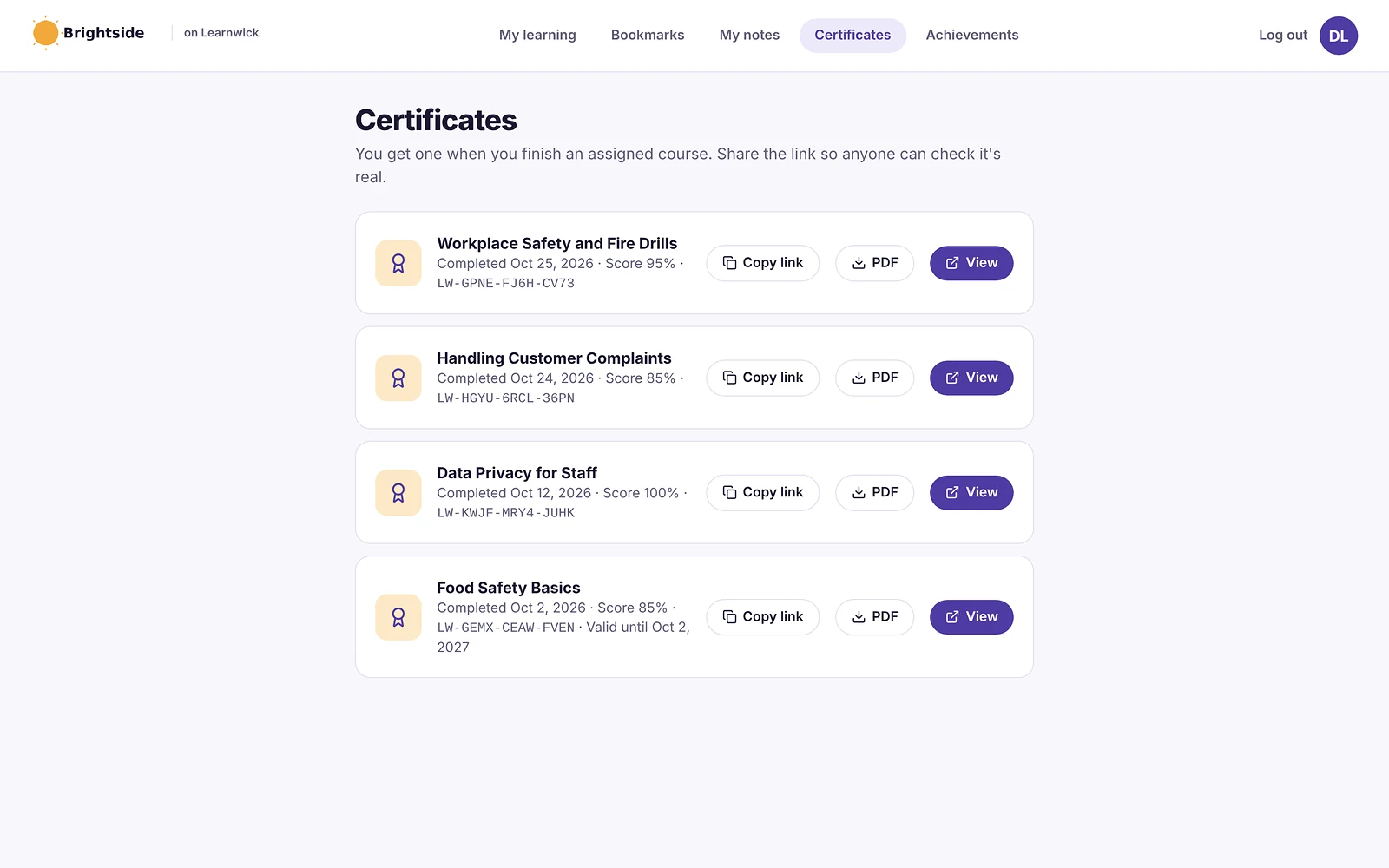
- Certificates: PDF certificates on completion, with renewal dates and a code anyone can check online.
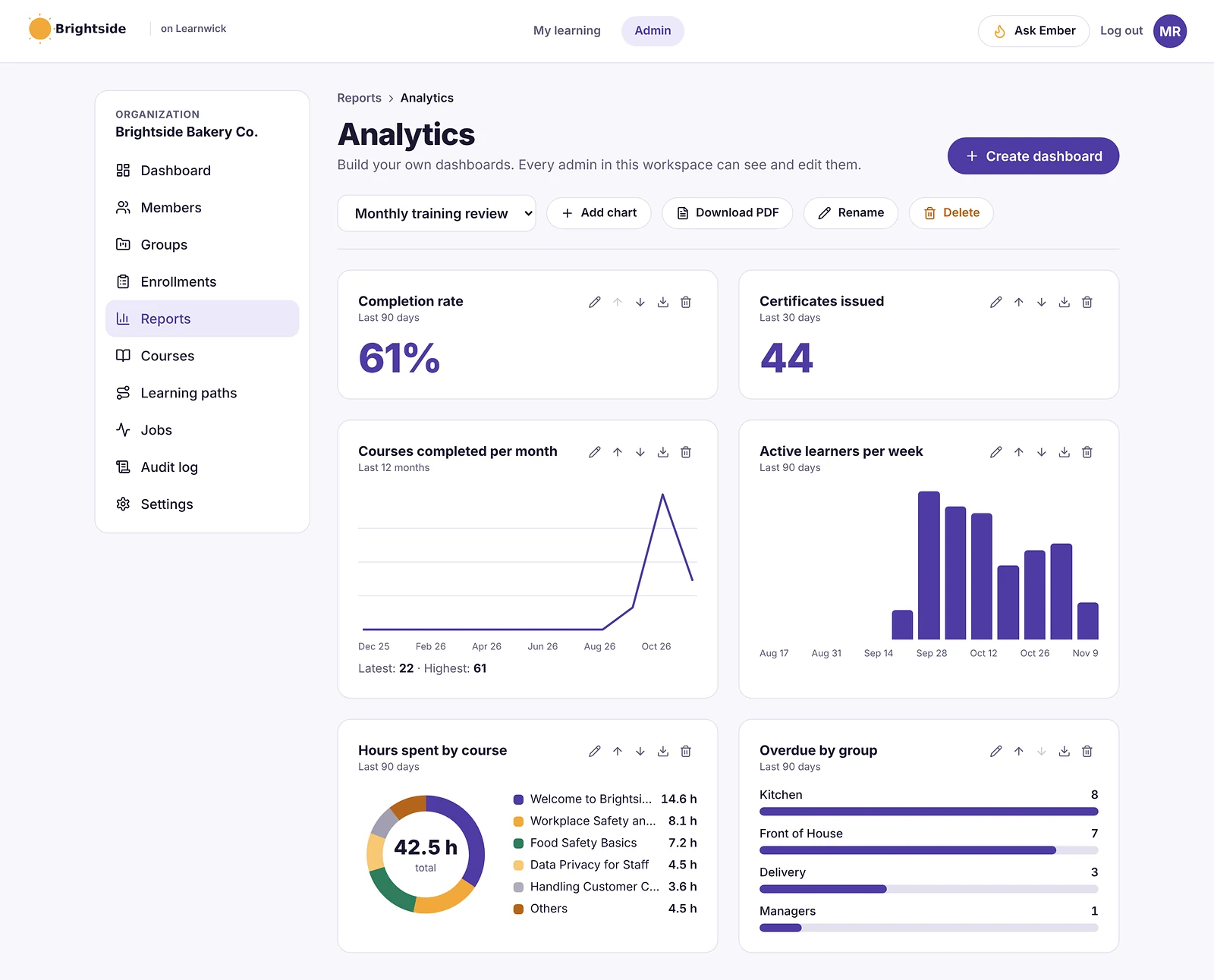
- Reports: an overdue list, completion and quiz reports, time spent, analytics dashboards, custom reports, a training matrix and training gaps by role, all exportable to CSV.
- Learning paths, points and badges: courses in order, plus optional points, badges and a leaderboard.
- Getting people in: invites, CSV import, a join link (optionally limited to your email domain) and Google or Microsoft sign-in.
Pros
- Free plan for up to 30 learners, with every feature and no time limit.
- Published prices on the pricing page; monthly or yearly, cancel any time.
- Every feature on every plan: paid plans only change how many learners you can have.
- Nothing to install, host or update.
- Builds a first course from a document in minutes.
- The AI assistant never changes anything on its own: an admin confirms every action, so that nothing goes live without a human check.
Cons
- No connection to HR or payroll systems yet (people come in by invite, CSV, a join link, or Google/Microsoft sign-in).
- No xAPI, cmi5 or multi-SCO SCORM 2004 with sequencing.
- No live classes or virtual classroom, and no selling courses to the public.
- No native mobile app (the web app works on any phone) and app screens are in English only.
- A young product: few third-party reviews yet, and a small ready-made course library.
- Not a phishing-simulation platform: no simulated attacks, risk scores or report button.
Pricing
- Free: up to 30 learners, every feature, no time limit.
- Starter: $79/month billed yearly ($99 monthly) for up to 100 learners.
- Growth: $239/month billed yearly ($299 monthly) for up to 500 learners.
- Business: $399/month billed yearly ($499 monthly) for up to 1,000 learners.
- Enterprise: over 1,000 learners, price on request.
So that works out at $0.79 per learner per month on Starter (100 learners) and as little as $0.40 on Business (1,000 learners), billed yearly.
Learnwick LMS · Free plan
Try Learnwick LMS free
Turn your acceptable-use policy into a course with Ember and assign it to everyone today. Free for up to 30 learners, no credit card.
2. Hoxhunt
Best for: organizations that want engagement-led behavior change.
Hoxhunt is built around adaptive, gamified phishing training that adjusts to each person and rewards reporting.
Strengths
- Strong engagement and reporting rates.
- Adaptive difficulty per user.
Watch out for
- Quote-only pricing.
- Less of a general compliance library.
Works with an LMS?
Integrations and data exports; check SCORM and LMS options with the vendor.
Pricing
Quote.
3. Proofpoint ZenGuide
Best for: organizations already using Proofpoint email security.
Proofpoint’s security awareness product, now called ZenGuide, ties training to the threats Proofpoint sees in your email.
Strengths
- Training based on real threats targeting your people.
- One vendor for email security and awareness.
Watch out for
- Best inside the Proofpoint ecosystem.
- Enterprise-oriented interface.
Works with an LMS?
Offers LMS options including SCORM; confirm on your plan.
Pricing
Quote; buyer estimates vary widely.
4. Mimecast Engage
Best for: organizations using Mimecast email security.
Mimecast’s awareness product pairs short training with phishing simulation and risk scoring.
Strengths
- Short, frequent training.
- Bundles with Mimecast email security.
Watch out for
- Best with Mimecast email.
- Quote-only.
Works with an LMS?
Check SCORM and LMS integration options with Mimecast.
Pricing
Quote.
5. SoSafe
Best for: European and GDPR-first organizations.
SoSafe, from Germany, offers behavior-based awareness training and phishing simulation with a strong European focus.
Strengths
- EU-based with strong GDPR posture.
- Engaging micro-learning.
Watch out for
- Quote-only.
- Smaller presence outside Europe.
Works with an LMS?
Offers LMS integration options; confirm SCORM availability.
Pricing
Quote.
6. Huntress Managed SAT
Best for: MSPs and small businesses.
Huntress Managed Security Awareness Training (built from its Curricula acquisition) is delivered with managed services, popular with MSPs.
Strengths
- Managed for you, good for small teams.
- Story-based training.
Watch out for
- MSP-oriented buying.
- Fewer enterprise controls.
Works with an LMS?
Check exports and LMS options with Huntress.
Pricing
Per user, often through MSPs.
7. Adaptive Security
Best for: organizations that want AI-driven, personalized simulations.
Adaptive Security uses AI to create personalized simulations, including voice and video deepfake scenarios.
Strengths
- Modern AI-based attack simulations.
- Training for new threats such as deepfakes.
Watch out for
- Quote-only, per seat.
- Newer company.
Works with an LMS?
Check LMS integration options with the vendor.
Pricing
Quote per seat.
8. Usecure
Best for: MSPs and small businesses that want monthly per-user billing.
Usecure offers automated awareness training and phishing for small businesses and MSPs, with no minimum.
Strengths
- Monthly per-user billing.
- Simple automation.
Watch out for
- Lighter features for large enterprises.
- Smaller content library.
Works with an LMS?
Check SCORM options with the vendor.
Pricing
Published per-user pricing; check the vendor.
9. Microsoft Attack Simulation Training
Best for: organizations that already pay for Microsoft 365 E5.
Microsoft Defender for Office 365 Plan 2 (included in E5) includes attack simulation training with phishing simulations and training modules.
Strengths
- Included with Microsoft 365 E5.
- Native to Microsoft 365.
Watch out for
- Less engaging content than specialists.
- Needs E5 or Defender Plan 2.
Works with an LMS?
Training lives in Microsoft 365; export records for your LMS.
Pricing
Included in Microsoft 365 E5; otherwise a trial or add-on.
10. NINJIO
Best for: organizations that want short, story-driven video training.
NINJIO produces short animated episodes based on real breaches, with phishing simulation.
Strengths
- Engaging, short videos.
- Monthly content cadence.
Watch out for
- Fewer simulation features than KnowBe4.
- Quote-only.
Works with an LMS?
Offers SCORM delivery for LMSs; confirm on your plan.
Pricing
Quote.
Security awareness platform vs LMS: which does what
| Security awareness platform (KnowBe4…) | Learning management system (Learnwick…) | |
|---|---|---|
| Main job | Change security behavior and test it with simulated attacks | Deliver and record all required training |
| Content | Security videos, modules and phishing templates | Any course: security, harassment, safety, policies |
| Measures | Click and report rates, risk scores | Completions, quiz scores, certificates, renewals |
| Owner | Security team | HR, compliance or L&D |
| Audit output | Phishing and training reports | One training record per person across all topics |
Many companies use both: a security platform for simulations and coaching, and an LMS where security courses sit with every other mandatory course.
How “LMS integration” works for security training
There are three common ways to connect security awareness training to an LMS:
- SCORM packages. The vendor gives you a SCORM file that you upload to your LMS. Some, like KnowBe4’s, are lightweight packages that stream current content from the vendor, so you don’t re-upload when they update. Completions are recorded in your LMS.
- Native connectors or APIs. The vendor sends completions to your LMS or HR system automatically. Check which LMSs are supported.
- Report exports. You export completions from the security platform and import or attach them to your training records.
Before you choose, test one package or connector end to end: assign it, complete it, and check the result appears in your LMS report with the right date.
Phishing simulation results usually stay in the security platform. Your LMS records the training; your security tool records the behavior. Auditors may ask for both.
What to look for in a KnowBe4 alternative
- Simulation realism: AI-generated, multi-channel (email, SMS, voice) and current threats.
- Behavior change: adaptive difficulty, coaching and reporting rates, not just click rates.
- Content: length, languages, accessibility and how often it’s updated.
- LMS integration: SCORM, connectors or APIs, and whether they’re included in your tier.
- Admin effort: automation versus managed service.
- Contract: term length, renewal caps and seat true-ups.
- Compliance mapping: ISO 27001, SOC 2, HIPAA, PCI DSS and cyber-insurance requirements.
What a KnowBe4 alternative really costs
| Option | Typical price | Notes |
|---|---|---|
| KnowBe4 | About $1.63–$3.75 per seat per month (3-year term) | Published list |
| Hoxhunt, Proofpoint ZenGuide, Mimecast, SoSafe, Adaptive | Quote | Per seat |
| Huntress Managed SAT, Usecure | Per user, often through MSPs | Some published |
| Microsoft Attack Simulation Training | Included in Microsoft 365 E5 | Or Defender Plan 2 |
| Learnwick LMS | Free up to 30; $948 a year for 100 | LMS for all compliance training |
For 100 people, KnowBe4’s SAT Advanced list price is roughly $4,000 a year on a three-year term; adding an LMS for all other compliance training costs $948 a year with Learnwick.
Security training topics beyond phishing
Phishing gets the attention, but most security awareness programs also cover:
- Passwords and MFA: password managers, passkeys and MFA fatigue attacks.
- Business email compromise and payment fraud: fake invoices, changed bank details and CEO impersonation.
- Deepfakes and voice scams: cloned voices and video used to request payments or access.
- Data handling and privacy: classifying data, sharing files safely and reporting breaches.
- Remote and hybrid work: home Wi-Fi, public networks and shoulder surfing.
- Physical security: tailgating, clean desks and lost devices.
- AI tools: what can and can’t be pasted into AI assistants.
- Incident reporting: who to tell, how fast, and that reporting mistakes is welcome.
Several of these depend on your own rules (payment approval steps, AI usage policy, incident contacts). Short courses built from your own policies often work better than generic content, and they’re quick to create in an LMS with an AI course builder.
Making security training stick
Security awareness research and vendor data point to the same few habits:
- Short and frequent beats long and yearly. A few minutes a month keeps threats fresh.
- Coach, don’t shame. People who are embarrassed stop reporting. Instant, private coaching after a click works better than public league tables of failures.
- Reward reporting. A rising reporting rate is often a better sign of culture than a falling click rate.
- Make it relevant. Finance teams need payment-fraud scenarios; developers need secure-coding examples.
- Explain the why. People follow rules they understand, especially when the rule is your own policy.
- Measure both behavior and completion. Click and reporting rates show behavior; training records prove everyone was trained.
That last point is where many companies combine tools: a security platform measures behavior, and an LMS keeps the records alongside every other required course.
Building a yearly security awareness program
Whichever platform you choose, the programs that work tend to follow the same yearly rhythm:
- Baseline (month 1): run an unannounced phishing test to measure where you start.
- Annual core course (months 1–2): everyone completes a 20–30 minute security awareness course, with a quiz, due within a set window. New starters complete it in their first week or two.
- Policy acknowledgement: staff read and confirm your acceptable-use, password and data-handling policies, ideally as a short course with a few questions.
- Monthly micro-learning: two to five minutes a month on current threats, such as invoice fraud, MFA fatigue or deepfake calls.
- Ongoing simulations: phishing tests every month or two, varied in difficulty, with instant coaching for people who click.
- Role-based modules: extra training for finance (payment fraud), HR (data privacy), developers (secure coding) and executives (targeted attacks).
- Review (month 12): compare click and reporting rates with the baseline, check completions, and update the plan.
Steps 2, 3 and 6 are training records: an LMS handles them well, alongside your other mandatory courses. Steps 1, 4 and 5 are where a security awareness platform earns its place.
Compliance frameworks that expect security training
Many standards and contracts expect proof that staff receive security awareness training, which is why records matter as much as content:
- ISO/IEC 27001: requires awareness and training appropriate to people’s roles, with evidence.
- SOC 2: auditors commonly look for security awareness training at hire and at least yearly.
- HIPAA: requires a security awareness and training program for workforce members handling health information.
- PCI DSS: requires a formal security awareness program for staff with access to cardholder data.
- Cyber-insurance questionnaires: almost always ask whether staff receive phishing training and how often.
- NIS2 (EU): expects management bodies and staff to receive cybersecurity training.
In every case, auditors ask the same questions: who completed what, when, and how do you know new starters were trained? An exportable training record per person answers that quickly.
Questions to ask in a security awareness demo
- Show a simulation built from a real threat targeting companies like ours this month.
- What happens when someone clicks? Show the coaching they see.
- How do you measure behavior change, beyond click rate?
- Which languages and accessibility standards does the training meet?
- How do completions reach our LMS: SCORM, connector or export? Is it included in our tier?
- How long are the courses, and can we choose shorter ones?
- What does renewal look like after a multi-year term?
- How do you handle data privacy for employee behavior data?
- Can managers see results for their teams without seeing individuals’ mistakes publicly?
- What’s the admin time per month for a team our size?
Small business? A practical setup
If you have fewer than 100 people and no security team, you don’t need an enterprise program to cover the basics. A practical, low-cost setup looks like this:
- Write three short policies: acceptable use, passwords and MFA, and how to report something suspicious.
- Turn them into short courses with a few quiz questions each, and assign them to everyone with a due date. New starters get them automatically.
- Add one general security awareness course each year, from a vendor’s SCORM package or a free resource.
- Run a phishing simulation a few times a year, using a small-business tool, your MSP’s service or, if you have Microsoft 365 E5, Attack Simulation Training.
- Keep the records in one place so you can answer a cyber-insurance questionnaire in minutes.
With Learnwick, steps 2, 3 and 5 fit on the Free plan for up to 30 people, and on Starter beyond that.
How to switch from KnowBe4
- Check your term and renewal date; KnowBe4 contracts are often multi-year.
- Export training and phishing history for audits and trend comparisons.
- Run the new platform’s baseline phishing test before the old one ends.
- Reconnect your LMS: new SCORM packages or connectors, and test completions.
- Re-create your yearly training plan and due dates.
- Tell employees the reporting button or process is changing.
- Keep old reports for auditors and insurers.
Run the new baseline test before turning the old platform off, so you can compare like with like.
Choose by what you need
- Choose Learnwick LMS when you want security courses in one LMS with all other compliance training, free for up to 30 learners.
- Choose Hoxhunt for engagement-led behavior change.
- Choose Proofpoint ZenGuide or Mimecast Engage if you use their email security.
- Choose SoSafe for EU and GDPR-first organizations.
- Choose Huntress Managed SAT or Usecure for MSPs and small businesses.
- Choose Adaptive Security for AI and deepfake simulations.
- Choose Microsoft Attack Simulation Training if you already have E5.
- Choose NINJIO for short, story-driven videos.
See our compliance training software page and SCORM LMS page, or compare Learnwick plans on the pricing page.
Learnwick LMS · Free plan
Put all your compliance training in one place
Create a free workspace, upload one security SCORM course next to your policies and assign it. Every feature included.
Frequently asked questions
What is the best alternative to KnowBe4?
Hoxhunt for engagement, Proofpoint ZenGuide or Mimecast Engage if you use their email security, SoSafe for EU organizations, Huntress Managed SAT or Usecure for small businesses, and Microsoft Attack Simulation Training if you have Microsoft 365 E5.
How much does KnowBe4 cost?
KnowBe4 lists security awareness training at about $1.63 to $3.75 per seat per month on a three-year term, depending on seat count and content level. Shorter terms cost more.
Does KnowBe4 integrate with an LMS?
Yes. KnowBe4 offers lightweight SCORM downloads that stream its content into a third-party LMS, where SCORM downloads are enabled on your plan.
Which KnowBe4 alternatives integrate with an LMS?
Most offer SCORM packages, connectors or report exports. Check which method is included in your plan and test it with your LMS before you sign.
Can I use Learnwick for security awareness training?
Yes, as the LMS: upload security SCORM courses or build courses from your own security policies, with due dates, reminders and yearly certificates. Learnwick does not run phishing simulations. It is free for up to 30 learners.
Is Microsoft Attack Simulation Training free?
It is included with Microsoft 365 E5 or Microsoft Defender for Office 365 Plan 2; it is not included in lower plans.
How often should staff do security awareness training?
Most programs run a core course at hire and at least once a year, plus short monthly refreshers and regular phishing simulations. Check what your auditors and insurers require.
Do I need an LMS if I have KnowBe4?
Not for security training alone. But if you also run harassment, safety, privacy and policy training, an LMS keeps one record per person across all of it, and KnowBe4 content can be added through its SCORM downloads.
What is the cheapest KnowBe4 alternative?
Microsoft Attack Simulation Training costs nothing extra if you already have Microsoft 365 E5. Small-business tools such as Usecure bill monthly per user with no minimum. For the training-record side, Learnwick LMS is free for up to 30 learners.
Can KnowBe4 content run in Learnwick?
KnowBe4 offers SCORM downloads for third-party LMSs on plans where they are enabled. Learnwick runs SCORM 1.2 and single-SCO SCORM 2004 packages; test one package before rolling it out to everyone.
Who owns KnowBe4?
Vista Equity Partners took KnowBe4 private in 2023.
The author

Venchito Tampon
Venchito Tampon is the founder of Learnwick, the LMS for small business — a simple, affordable way to upload or build courses, assign training, give certificates and see who has finished.
He is also the CEO and founder of eLearning Solutions Lab, a Philippines-based eLearning production company making custom and rapid eLearning for clients around the world, and Chief Learning Officer of Rainmakers Training & Consultancy, a corporate training and leadership development company.
He is a Certified Learning & Development Professional (CLDP) and a certified executive coach, and also founded ExpirePilot and Sidelight 360.